
Chrome Notepad: A Simple and Convenient Extension for Taking Notes
Chrome Notepad is a user-friendly and practical Chrome extension that provides a simple notepad with essential formatting options. With this extension, users can easily take notes, format text, and store their notes for future reference.
Top Recommended Alternative

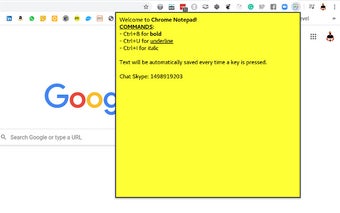
Upon clicking on the Chrome Notepad icon, a convenient popup window appears, allowing users to quickly access and utilize the notepad. The interface is clean and intuitive, making it easy for users to start typing their notes without any distractions.
One of the key features of Chrome Notepad is its support for basic text formatting. Users can select specific words or phrases and apply formatting commands using simple keyboard shortcuts. To make text bold, users can press Ctrl+B. To underline text, Ctrl+U is the command to use. And for italicizing text, Ctrl+I is the shortcut to remember.
Another advantage of Chrome Notepad is that it automatically saves all notes to the Chrome storage. This means that users can seamlessly access their notes across different devices and browsers, without the worry of losing their valuable information.
Overall, Chrome Notepad is a reliable and efficient tool for those who need a quick and accessible notepad with basic formatting options. Whether you're jotting down ideas, making to-do lists, or taking important notes, this Chrome extension provides a convenient solution.











.jpg)